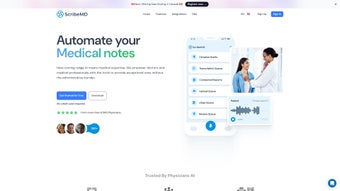

Download ScribeMD – AI‑Powered Medical Documentation Tool
Overview of ScribeMD
In the fast‑paced world of healthcare, clinicians spend a disproportionate amount of time transcribing patient encounters instead of focusing on direct care. ScribeMD tackles this inefficiency by offering an AI‑driven “Digital Scribe” that records, formats, and stores medical notes in real time. Built as a web‑based application, ScribeMD leverages a sophisticated Language Learning Model (LLM) to understand natural speech, capture clinical terminology, and produce documentation that meets the standards of modern electronic health record (EHR) systems.
The platform’s core promise is to let physicians, nurses, and allied health professionals concentrate on the patient while the software handles the administrative burden. Security is baked into every layer of the service; ScribeMD complies with HIPAA and SOC 2 regulations, ensuring that protected health information (PHI) remains encrypted both in transit and at rest. Moreover, the solution integrates seamlessly with leading EHR platforms, eliminating duplicate data entry and preserving data integrity across the care continuum.
By automating note‑taking, reducing manual errors, and shortening chart‑completion times, ScribeMD not only boosts productivity but also supports higher‑quality patient outcomes. Whether you run a solo practice or a multi‑site hospital system, the tool is designed to scale, offering a secure, cost‑effective way to modernize documentation workflows without sacrificing compliance or usability.
Key Features and Pros / Cons
- Digital Scribe: Real‑time voice capture that converts conversation into structured SOAP notes.
- HIPAA & SOC 2 Compliance: End‑to‑end encryption, audit trails, and role‑based access controls.
- EHR Integration: Bi‑directional sync with Epic, Cerner, NextGen, and other major systems.
- Customizable Templates: Specialty‑specific note templates for cardiology, orthopedics, primary care, etc.
- AI‑Powered Error Detection: Automatic flagging of missing fields, medication mismatches, and coding inconsistencies.
- Secure Cloud Storage: Redundant servers with automatic backups and disaster recovery.
- Multi‑Language Support: English, Spanish, and French speech recognition for diverse patient populations.
- Analytics Dashboard: Insightful metrics on documentation time, note quality, and clinician workload.
Pros
- Significant reduction in documentation time—studies show up to 60 % faster note completion.
- Improved accuracy with AI‑driven validation and template enforcement.
- Seamless EHR integration eliminates double data entry.
- Strong compliance posture protects practices from regulatory penalties.
- Scalable pricing model suitable for both small clinics and large health systems.
Cons
- Initial learning curve for clinicians unfamiliar with voice‑capture technology.
- Requires reliable internet connectivity; offline mode is limited.
- Custom template creation may need IT assistance for complex specialties.
- Subscription pricing can be higher than basic dictation apps for small solo practices.
Installation, Usage & Compatibility
Getting started with ScribeMD is intentionally straightforward. The application is hosted in the cloud, so there is no local software to install on a workstation. Users simply navigate to www.scribemd.com and create an account using a corporate email address. After verification, an admin can invite clinicians and assign role‑based permissions through an intuitive web portal.
Step‑by‑step setup:
- Visit the ScribeMD sign‑up page and complete the registration form.
- Verify your email address and log in to the admin console.
- Configure EHR connection by entering API credentials (Epic, Cerner, etc.).
- Upload or select pre‑built specialty templates.
- Invite clinicians and provide them with a one‑time access token.
- Conduct a brief onboarding session to train staff on voice commands and note review workflow.
Once configured, clinicians access the Digital Scribe via a secure web browser on any device—desktop, laptop, tablet, or smartphone. The platform supports the latest versions of Chrome, Edge, Firefox, and Safari, ensuring broad compatibility across operating systems. In the Windows 10/11, macOS 12+, iOS 14+, and Android 9+ environments, the AI engine runs entirely in the cloud, so local hardware requirements are minimal (a microphone and a stable internet connection). For institutions with strict network policies, ScribeMD offers a dedicated VPN tunnel and optional on‑premise gateway to keep data within the organization’s firewall.
Daily usage follows a natural workflow: clinicians start a patient encounter, click the “Start Scribe” button, and speak naturally as they conduct the exam. The AI transcribes speech, organizes content into the selected template, and surfaces a draft note in real time. Users can edit, add codes, or approve the note with a single click. The completed documentation is then pushed automatically to the connected EHR, where it appears as a standard encounter record. This end‑to‑end process eliminates the need for manual copy‑and‑paste, reduces transcription errors, and frees up valuable face‑to‑face time.
FAQ, Review & Final Thoughts
Frequently Asked Questions
Is ScribeMD HIPAA‑compliant?
Yes. ScribeMD meets HIPAA and SOC 2 requirements with encrypted data transmission, role‑based access, and audit logging.
Which EHR systems does ScribeMD integrate with?
It supports bi‑directional integration with Epic, Cerner, NextGen, Allscripts, and many other major platforms via standard APIs.
Do I need a special microphone for accurate transcription?
A standard headset or built‑in laptop microphone works fine; however, a noise‑cancelling mic can improve accuracy in busy clinical settings.
Can I use ScribeMD offline?
Offline functionality is limited. The core transcription engine runs in the cloud, so a stable internet connection is required for full operation.
What pricing model does ScribeMD offer?
ScribeMD provides subscription‑based pricing per clinician, with tiered discounts for larger organizations. A free 14‑day trial is available for evaluation.
Expert Review
Overall Rating: 4.6/5
ScribeMD delivers on its promise to streamline clinical documentation. The AI transcription accuracy is impressive, especially after a brief acclimation period. Integration with leading EHRs is smooth, and the compliance framework gives peace of mind to administrators. While the reliance on internet connectivity can be a drawback in remote settings, the productivity gains more than offset this limitation. For most modern practices looking to reduce charting time and improve documentation quality, ScribeMD is a compelling investment.
Conclusion & Call to Action
In an industry where every minute of patient interaction counts, ScribeMD stands out as a secure, AI‑enhanced solution that reshapes how clinicians capture medical notes. By automating the mundane aspects of documentation, the platform frees providers to do what they do best—deliver compassionate, evidence‑based care. If you’re ready to cut down on paperwork, improve chart accuracy, and stay compliant with the highest data‑privacy standards, download ScribeMD today and start your free trial. Experience a faster, safer, and more efficient way to document patient encounters—your practice, your patients, and your staff will thank you.



.png)



